PitCrew AI Livery works for Assetto Corsa too. You upload the paint template of your car, describe the design in one sentence, and the AI paints it. You download the file in the format Assetto Corsa expects.
Make a AC livery →How it works
1. Get the template of your car
Many car mods include a template folder. Templates for the Kunos cars are on RaceDepartment / Overtake.
2. Upload it and describe the design
Drop the template in the livery tool (PNG, JPG or TGA, with the line layer on), add your logo if you like, and describe the design in one sentence.
3. Download the file
You get livery.dds, ready for the game.
4. Install it
Create a new folder in assettocorsa\content\cars\<car>\skins\ and put livery.dds in it, named like the large texture in an existing skin folder of that car (e.g. Skin_00.dds). Then pick the skin in Content Manager.
FAQ
Does it work with every Assetto Corsa car?
Yes, as long as you have the paint template of that car. The AI paints on whatever template you upload.
What does it cost?
One livery costs 10 credits. New accounts get 25 free credits, so your first livery is free.
Can I tweak the result?
Yes. Describe a change (“make the stripes thinner”) and the AI adjusts the same livery; the first three tweaks are free.
Custom livery for Assetto Corsa, made with AI
25 free credits when you sign up. One livery is 10 credits. No subscription needed.
Open the livery toolOther sims
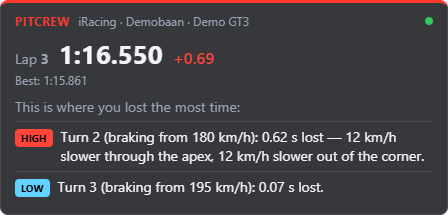
Coaching while you drive: PitCrew Overlay
Next to the AI Engineer, PitCrew Academy has a free desktop app. PitCrew Overlay reads your sim live and shows after every lap, per corner, where you lost time. With an AI session (5 credits for 2.5 hours) you get advice after every lap. No subscription: you only pay for the sessions you drive.