Most sim racing overlays show what is happening right now: your speed, your gear, the gap to the car ahead. Useful, but they do not tell you what to do differently. Until now that meant opening telemetry in MoTeC or another tool after your session and working out what all those lines mean yourself.
PitCrew Overlay turns that around. The app reads your sim live and tells you in plain language after every lap which corners cost you time, and why. With an AI session, an AI race engineer tells you after every lap what to do differently on the next one.
What is a sim racing overlay?
An overlay is a small window that sits on top of your sim. It reads the data the sim itself shares for tools like this (the same source RaceLab and SimHub use) and shows it while you drive. It changes nothing in the game, and it is allowed in online races.
What does PitCrew Overlay do?
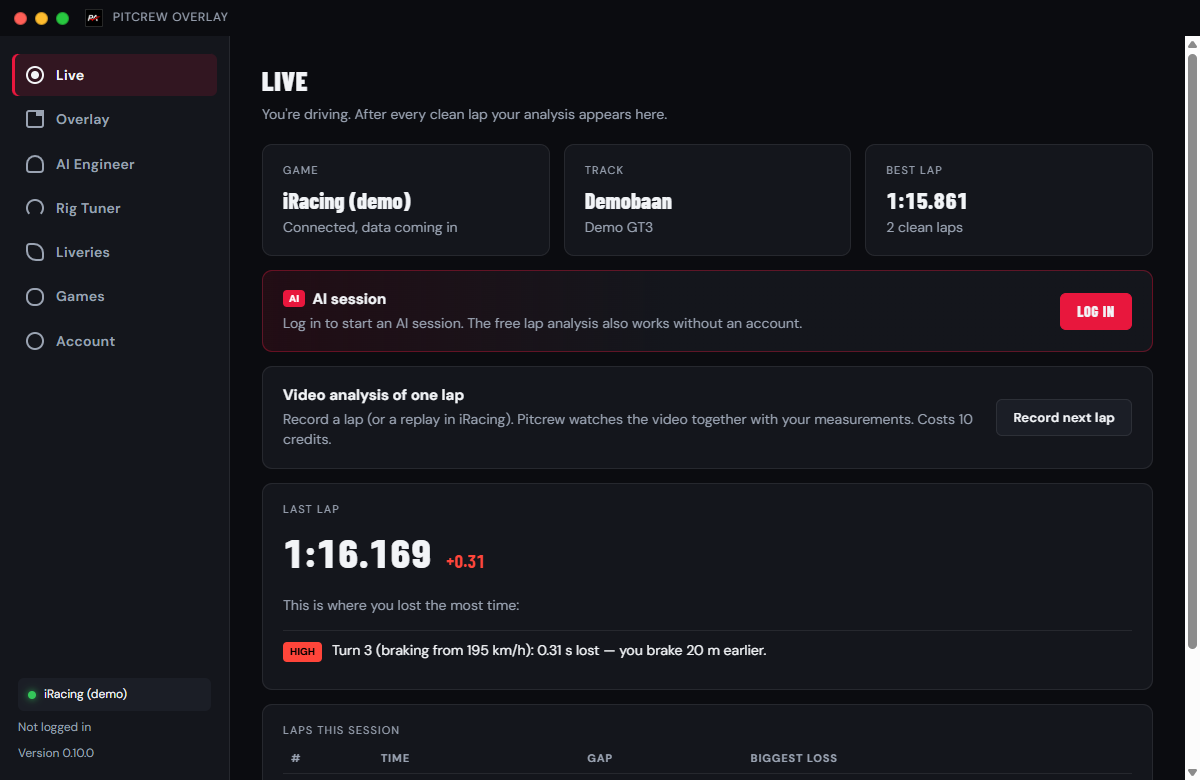
- After every lap: where the time went. The app compares every lap with your fastest and shows per corner what was different: your braking point, your apex speed, how long you coasted without throttle or brake, and when you got back to full throttle. Free, no account needed.
- AI session: 2.5 hours of coaching for 5 credits. After every lap you get up to three concrete tips and one focus point, plus a debrief of your session at the end. No subscription.
- AI Engineer in the garage. Step out of the car and the AI Engineer opens with your sim, car, track, setup and lap data already filled in. You only type your question.
- Video analysis of a lap. Record a lap (or an iRacing replay) from the app. The AI watches the video together with your measurements. Costs 10 credits.
- Second screen. Put the analysis on your phone or tablet next to your rig, over your own Wi-Fi.
How does the lap analysis work?
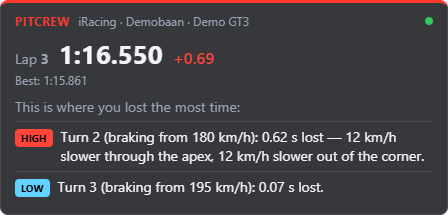
While you drive, the app measures your speed, brake, throttle and track position dozens of times per second. After a clean lap it finds the braking zones and compares every corner with the same corner on your fastest lap. The corners where you lost the most come first, labelled HIGH, MEDIUM or LOW.
An example: "Turn 2: 0.62 s lost. 12 km/h slower through the apex, you brake 17 m earlier." That is something to work on straight away on the next lap, without reading a graph. Want to learn to read this data yourself? Read what is sim racing telemetry.
The AI session: a race engineer for every lap
When you start an AI session, the app sends a short summary to the AI after every lap. It looks at your recent laps together and finds the pattern: are you braking too early everywhere, or only losing time in the slow corners? You get advice that builds on itself, not random tips per lap.
A session lasts 2.5 hours and costs 5 credits. An iRacing race or an evening of practice fits in easily. Sign up and you get 25 free credits, plus 10 more the first time you log in to the app: enough for seven sessions.
Which sims are supported?
- iRacing: works straight away, also in replays.
- Assetto Corsa Competizione and Assetto Corsa: work straight away.
- Le Mans Ultimate and rFactor 2: with a free plugin; the app explains how.
- Automobilista 2: switch on one shared memory option in the game.
- RaceRoom: works straight away.
- Gran Turismo 7: GT7 runs on the PS5, where no overlay is possible. The app on your PC picks up the data from your PS5 over your home network; you see the analysis on your PC or phone.
Install in four steps
- Download PitCrew-Overlay-Setup.exe (Windows 10/11, 64-bit, about 120 MB).
- Run the installer. If Windows shows "Windows protected your PC", choose More info and Run anyway. Does Smart App Control block it with no way to continue? Then the app cannot be installed on that PC yet; we are working on a digital signature.
- Log in with your PitCrew Academy account, or continue without an account first.
- Set your sim to borderless window. In true fullscreen no overlay can sit on top of the game.
Download PitCrew Overlay free →
PitCrew Overlay next to RaceLab or SimHub
RaceLab and SimHub are strong at live information during a race: standings, gaps, fuel, dashboards. PitCrew Overlay focuses on something else: what to do differently to get faster. So you can easily use them side by side. For more tools, see the best sim racing apps of 2026.
Frequently asked questions
Is PitCrew Overlay free?
Yes. The download, the overlay and the per-corner lap analysis are free. Only an AI session (5 credits for 2.5 hours), video analysis and questions to the AI Engineer cost credits.
Does it work in VR?
Not yet. The overlay is a normal window on top of your sim. You can view the analysis on your phone or tablet, though.
Is an overlay allowed in online races?
Yes. The app only reads the data the sims themselves share for tools like this, just like RaceLab and SimHub. It changes nothing in the game.
What happens to my data?
The raw telemetry stays on your computer. During an AI session only a small summary per lap goes to the AI; it is kept for 30 days.
Does it work on a Mac?
No, the app is for Windows 10 and 11. Most PC sims only run on Windows as well.
Try PitCrew Overlay
Free for Windows. Sign up and get 25 credits, plus 10 extra the first time you log in to the app: enough for seven AI sessions.
Read also: what is sim racing telemetry and sim racing training at home.