Coach Dave Delta is one of the most complete packages in sim racing: more than 1,000 pro setups, telemetry, corner-by-corner Auto Insights and onboard video, for €12.49 a month or €109 a year. But not everyone needs all of that, or wants another subscription. Below are four alternatives, what each one does best and who it suits.
Prices checked on the providers' own websites in November 2026. They change, so always check before you buy.
The alternatives at a glance
| Best for | Price | AI coaching | Pro setups | Sims | |
|---|---|---|---|---|---|
| Coach Dave Delta (benchmark) | Setups + telemetry in one app | €12.49/mo or €109/yr | Auto Insights | 1,000+ | iRacing, ACC, LMU, AC Evo, AC, AMS2 |
| Track Titan | Free lap tracking, AI tips | Free · Plus $7.99/mo · Ultra $19.99/mo | Yes (Plus and up) | Hymo setups (Setup/Ultra) | Many sims, incl. F1 games |
| VRS | iRacing data packs from pros | Free · €4.99 or €9.99/mo | No (human coaching extra) | Via data packs | iRacing |
| Garage 61 | Free iRacing telemetry, teams | Free · Pro about €5/mo (yearly) | No | Shared by the community | iRacing |
| PitCrew Academy | Live coaching per lap, no subscription | Overlay free · AI with credits from €10 | Yes: per lap + fastest-lap analysis | No library (AI setup advice) | iRacing, ACC, AC, LMU, rF2, RaceRoom, AMS2 |
1. Track Titan: the biggest free tier
Track Titan's free Community plan records unlimited laps in all supported games, with telemetry analysis and a comparison with your own theoretical best lap. For AI driving tips and thousands of pro reference laps you need Plus ($7.99 a month); Hymo esports setups for iRacing, LMU, AMS2 and ACC come with the Setup ($14.99) or Ultra ($19.99) plan. All paid plans have a 7-day free trial.
- Good for: drivers who want to start for free, switch between many games (including the F1 games) or want pro reference laps.
- Less good for: anyone who wants setups and AI tips without paying the top tier every month.
2. VRS: pro data for iRacing
VRS (Virtual Racing School) is built around iRacing. The free Basic plan gives you your own telemetry and analysis tools; Dedicated (€4.99 a month) unlocks one data pack and Competitive (€9.99 a month) all essential data packs with laps and setups from pro drivers. Yearly billing saves 20%. One-on-one coaching with pro coaches is sold separately.
- Good for: iRacing drivers who learn best by laying their lap over a pro lap.
- Less good for: other sims, or drivers who want the analysis done for them.
3. Garage 61: free and community-driven
Garage 61 records your iRacing laps with a small Windows agent and analyses them in the browser. Laps, setups and ghost laps are shared within the community and your team. The free plan keeps a year of data; Pro (about €5 a month, billed yearly) adds unlimited storage, advanced filters and team features. There is no AI coaching: you read the data yourself.
- Good for: iRacing teams and drivers who like to analyse telemetry themselves.
- Less good for: other sims, or drivers who want to be told what to change.
4. PitCrew Academy: coaching while you drive, no subscription
PitCrew Academy works differently. The PitCrew Overlay is a free Windows app that reads your sim live. After every lap it shows, per corner, where you lost time and why (braked too early, slower through the apex, late on the throttle). It can read that out loud in English, German, French, Spanish or Dutch, beep at your braking points, and it has a spotter, a theoretical best lap and a leaderboard per car and track.
The AI costs credits instead of a subscription. An AI session (5 credits, up to 2.5 hours) gives AI tips after every lap and, at the end, goes through your fastest lap in depth: the corners where the most time is, and whether that is down to your technique or to the car, with the setup change if it is the car. The AI Engineer answers setup questions in your sim's own terms. You get 25 free credits when you sign up and 10 free credits every month in the app; packs start at €10 for 30 credits.
- Good for: drivers who want concrete feedback per lap, in their own language, and only pay when they use the AI.
- Less good for: anyone who wants a library of ready-made pro setups or pro reference laps. PitCrew has neither (yet): it compares you with your own best lap, your theoretical best and laps shared by other users.
Which alternative fits you?
- You mainly want pro setups: stay with Coach Dave Delta, or take Track Titan Setup/Ultra.
- You want to spend nothing: Track Titan Community, Garage 61 (iRacing) or the PitCrew Overlay.
- You only race iRacing and like data: Garage 61 or VRS.
- You want to be told what to do after every lap, without a subscription: PitCrew Academy.
These tools also combine well: plenty of drivers use a setup subscription for the baseline and a coaching tool to find the time in their own driving.
Frequently asked questions
Is there a free alternative to Coach Dave Delta?
Yes. Track Titan's Community plan, Garage 61 (iRacing only) and the PitCrew Overlay are free. None of them includes a free library of pro setups: for that you pay at Coach Dave, Track Titan or VRS.
What is the cheapest Coach Dave alternative with AI coaching?
Track Titan Plus costs $7.99 a month for unlimited AI driving tips. At PitCrew Academy you pay per session instead: an AI session costs 5 credits, and you get 25 free credits when you sign up plus 10 every month in the app.
Which alternative has the most pro setups?
Coach Dave Delta, with more than 1,000 pro setups. Track Titan offers Hymo esports setups in its Setup and Ultra plans; VRS includes setups in its data packs for iRacing.
Does Coach Dave Delta work in other languages?
Yes, the Delta app is available in 11 languages. PitCrew Academy's AI tips, voice and debriefs are available in English, German, French, Spanish and Dutch.
Try the free overlay
Free for Windows. Feedback per corner after every lap, from the first lap you drive.
Download PitCrew Overlay →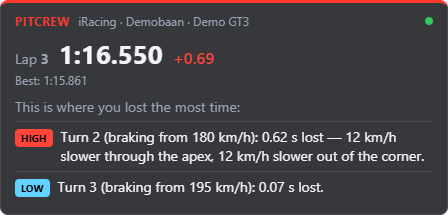
Coaching while you drive: PitCrew Overlay
Next to the AI Engineer, PitCrew Academy has a free desktop app. PitCrew Overlay reads your sim live and shows after every lap, per corner, where you lost time. With an AI session (5 credits for 2.5 hours) you get advice after every lap. No subscription: you only pay for the sessions you drive.